
A familiar scene unfolds: a player settles into Infinity Nikki for a cozy styling session, and the game responds with a character model that seems to have forgotten how joints work. That is the peculiar charm of live-service games—sometimes the biggest mystery is not a puzzle but a glitch. As of 2026, the known bug list still gives players a useful starting point, even if newer patches have arrived. The public bug list used here dates from 2025, so players should pair it with current patch notes. The core issues below come from the community-facing bug list, and the fixes are the practical first steps players can try before waiting for an official patch.
The Usual Suspects: Known Bugs
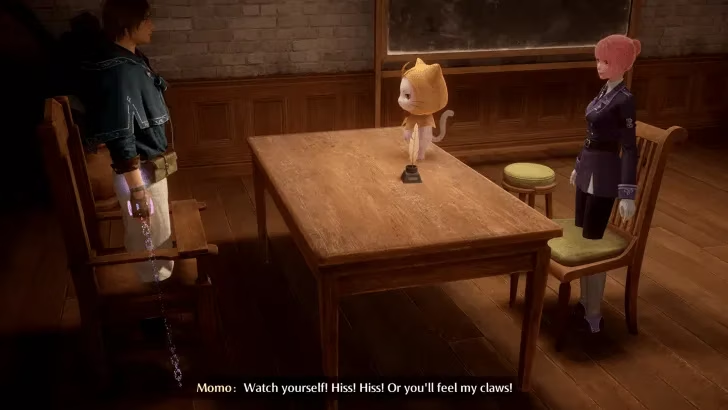
Infinity Nikki has seen several recurring bugs. One is a graphical issue where multiple character models glitch out, perform incorrect animations, or skip animations entirely during gameplay and cutscenes. In one reported cutscene, camera angles failed to focus on the characters, and models clipped through chairs. It is the kind of moment that feels like a couture gown caught in a revolving door—glamorous until physics intervenes. Players may laugh, but it can also break immersion and make story scenes hard to follow.
Another issue appears during Account Linking between PSN and Infinity Nikki or Infold Accounts. The link can fail when the PSN account or email already has an associated Infold account. The fix is not mysterious: players should make sure the PSN account or the email they want to use has no related Infold account during linking. In other words, the account has to arrive at the party without an uninvited plus-one.
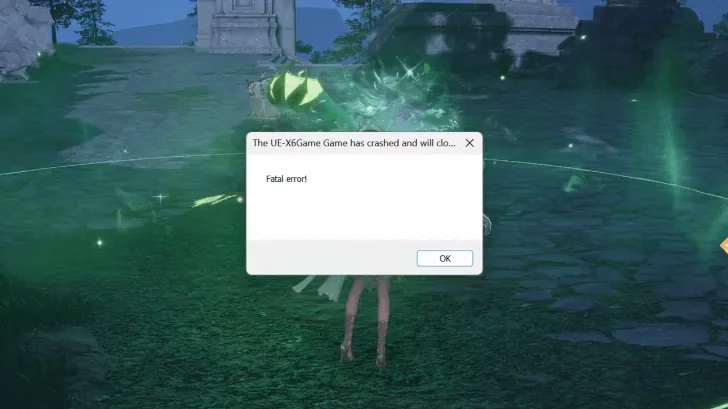
Then there is the Fatal Error bug. Its causes are currently unknown, but it shuts the game down and sends players to a troubleshooting page. That is about as welcome as a fire drill in the middle of a fashion show. Players cannot do much about an unknown cause, but they can try the standard checks below and report the crash if it repeats.
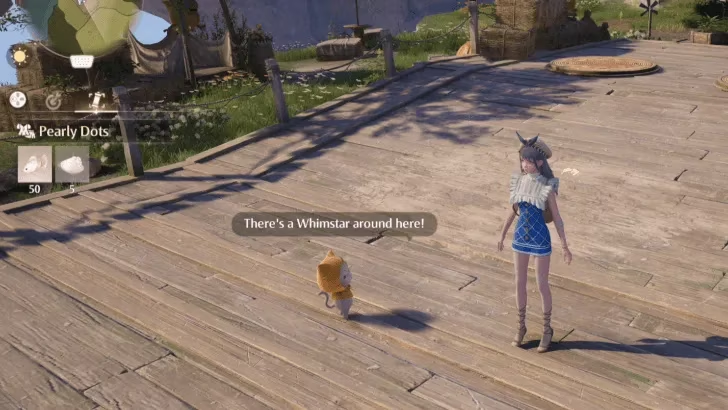
Momo has his own bug too: the speech bubble that notifies the player about nearby Whimstars can stay permanently active even when no Whimstars are present. It is like a smoke alarm that keeps chirping after the toast is done. Cute at first, less cute after ten minutes. Players who see this should note where it happens and report it, since a stuck UI prompt can point to a state-tracking issue.
Fixes Players Can Try
| Bug or error | Practical fix |
|---|---|
| Character model glitches, wrong animations, clipping | Verify game files, update the game, and report the bug with platform details. |
| PSN and Infold account linking failure | Confirm that the PSN account or email has no existing Infold account associated with it before linking. |
| Fatal Error shutdown | Verify game files, update graphics drivers and device software, then contact Customer Support if it continues. |
| Momo Whimstar bubble stuck on | Report the bug to Customer Support and note the location; no confirmed player-side fix is listed. |
The first fix is file verification. On the log-in screen, players can use the wrench-and-screwdriver icon to verify game files. This checks whether any game files are corrupted and need to be downloaded again. It is like giving a wardrobe a full inventory before a big trip: tedious, but it catches the missing buttons before they ruin the outfit. If the game has partially downloaded an update or a file has been damaged, this step can save a lot of guessing.
The second fix is reporting to Customer Support. Players should include the platform, what they were doing, whether the bug happened in a cutscene or free roam, and any error message. A clear report is more useful than a vague complaint. Customer Support may have a more immediate response or solution, especially for account-linking problems and repeated fatal errors.
For account linking, the key is to check ownership. The PSN account or the email being linked must not already have an Infold account associated with it. Players who are unsure should check their existing account details before trying again. This is less about technical magic and more about making sure two identities are not trying to wear the same name tag.
Finally, players should update the device and software used to run Infinity Nikki. Graphics drivers, the game itself, and the platform software may need updates before the game returns to a playable state. A stale driver can cause graphical glitches that look like game bugs, and an outdated client can create errors that a patch has already addressed. As of 2026, this advice is still the sensible baseline: check current patch notes, verify files, update drivers, and report persistent issues.
What to Do Next
Players who hit a bug should not assume the game is broken forever. The known list is a map, not a verdict. They can verify files, update software, check account details, and report the issue. If the bug is purely visual, they can note the platform and scene; if it is a crash, they can note the error and what preceded it. The more specific the report, the easier it is for support and developers to trace.
The related guides around Infinity Nikki—Version 1.5 release details, server maintenance and status, cross-save, platforms and consoles, multiplayer and co-op, pre-registration, voice actors, free-to-play status, romance, and differences from Shining Nikki—are useful context, but the bug list itself is the place to start when something looks wrong. In 2026, the smartest approach is still the same: treat the list as a first aid kit, not a magic wand. A little patience, a file check, and a clear report can turn a frustrating glitch into a solved mystery.
This assessment draws from OpenCritic, a widely used review aggregation platform that helps players compare critical reception across major releases. When evaluating a live-service title like Infinity Nikki alongside its bug reports and patch cadence, broader critical consensus can give useful context on whether technical issues are isolated annoyances or part of a larger pattern affecting player experience.
Comments